As more businesses transition to cloud-based systems, the size of their in-house IT rooms continues to shrink. This shift not only frees up valuable square footage for offices, conference rooms, and collaborative workspaces, but also reduces the need for large IT infrastructure. Despite this smaller footprint, the remaining IT equipment still requires effective cooling to ensure optimal performance. Without proper cooling, equipment can overheat, causing system failures that disrupt operations and hinder employee productivity. In this article, we’ll explore the essential steps involved in designing an efficient cooling system for a typical IT room.
Step 1: Defining Design Criteria
The first step in designing an efficient cooling system for an IT room is to understand the specific needs of the tenant, including:
- Peak Heat Load from IT Equipment
Understanding the amount of heat generated by IT equipment is vital for selecting the appropriate cooling system. The system must be capable of handling the peak heat load to maintain the ideal temperature for equipment operation. - Capacity for Future Growth
It’s important to design the cooling system with future expansion in mind. Will additional servers, network devices, or other hardware be added later? The system should have enough capacity to accommodate future growth and avoid the need for costly upgrades. - Desired Temperature Range
The optimal temperature for an IT room typically ranges from 70-85°F, depending on the chosen cooling system. Setting the desired temperature is critical to ensuring the cooling system maintains an environment suitable for both the equipment and any personnel who may occasionally work in the room. - Temperature Control Requirements
A reliable temperature control system is essential. This can include thermostats or advanced monitoring systems to ensure the temperature stays within the desired range. - Redundancy for System Failure
Incorporating redundancy into the design minimizes the risk of cooling failure. This can include backup cooling systems and/or an Uninterruptible Power Supply (UPS) to maintain power during emergencies. - Alarms for System Malfunctions
Equipping the system with alarms to notify users of any failure is crucial. These alerts could be audible or sent directly to the IT department, enabling quick action to prevent equipment overheating or damage.
Step 2: Choosing a Cooling Solution
When designing cooling for an IT room in a tenant fit-up, there are two primary cooling options to consider:
Option 1: Transfer Fan
A transfer fan is a cost-effective solution for cooling an IT room. The system pulls air from an adjacent space, passes it through the IT room, and expels the warmed air into the building’s return air plenum.
- Cost: Typically more affordable, as it doesn’t require complex HVAC equipment or installation. Costs are limited to the fan and power connections.
- Temperature Limits: The temperature of the IT room cannot be reduced below that of the adjacent space. As such, temperatures usually range from 80-85°F, which is still acceptable for IT equipment.
- Make-Up Air: A space-to-space transfer duct with ceiling grilles, or a door louver, can facilitate airflow between the two spaces.
- Operation: The fan can operate continuously via a wall-mounted speed controller or be triggered by a thermostat to run when the room’s temperature exceeds the setpoint.

Option 2: AC Split-System
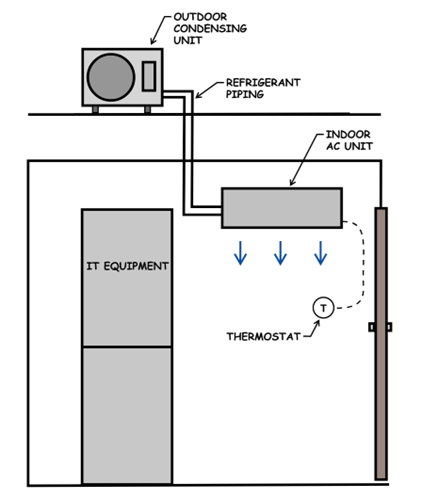
This system features an indoor AC unit (typically wall-mounted) and an outdoor condensing unit, connected via refrigerant piping. The indoor unit responds to a wall-mounted thermostat.
Refrigerant Line Lengths: The efficiency of the system is affected by the length of the refrigerant lines. If the piping exceeds 100 feet, an alternative cooling method (like a traditional CRAC unit) may be needed to maintain system efficiency.
Cost: Generally more expensive than the transfer fan due to the additional outdoor unit and refrigerant piping. Coordination is needed for installation and any landlord approval for outdoor unit placement.
Temperature Control: Using a refrigerant cycle, this system can maintain a much lower setpoint (typically 70-75°F) compared to the transfer fan.
Refrigerant and Condensate Piping: Proper routing of refrigerant and condensate piping is crucial to avoid any risk to IT equipment. The piping should be insulated to prevent condensation from dripping onto electrical components.
Step 3: Additional Design Considerations
1. Equipment Sizing
Properly sizing the cooling system is essential to ensure the IT room stays at the right temperature. In addition to typical heat sources from servers and computers, other factors should be considered:
- Lighting: The type and number of lights in the room will contribute to the overall heat load.
- Human Presence: If staff frequently occupy the room, their presence adds heat to the system.
- Electrical Equipment: Other equipment such as transformers and racks can generate additional heat.
- Building Location: If the IT room is located on the building’s perimeter or under a roof, it may be subject to additional heat gain from the outside environment.
2. Submetering
Submetering the electrical usage of the cooling system helps track energy consumption for accurate billing. This is typically required by landlords, ensuring tenants are billed for their specific energy usage.
As businesses increasingly adopt cloud-based IT solutions, the physical size of in-house IT rooms continues to shrink. However, the need for effective cooling remains essential to maintaining the proper operating conditions for IT equipment. By carefully assessing the tenant’s specific needs and selecting the appropriate cooling system, businesses can ensure their IT infrastructure operates smoothly, avoiding costly system failures and disruptions.
The process of designing an efficient cooling system is strategic and requires thorough consideration of the tenant’s needs, equipment, and potential future growth. By following these guidelines, businesses can implement reliable, energy-efficient cooling solutions that support the continued success of their operations.